Rolling update and Rollback
Revision 단위로 버전을 관리하여 업데이트와 롤백 버전을 관리하게 된다.
롤아웃 버전 알아보기
kubectl rollout status deployment/my-app-deplpoyment

kubectl rollout history deployment/my-app-deplpoyment
2가지 타입의 업데이트 전략이 존재함.
- recreate
- rollingupdate
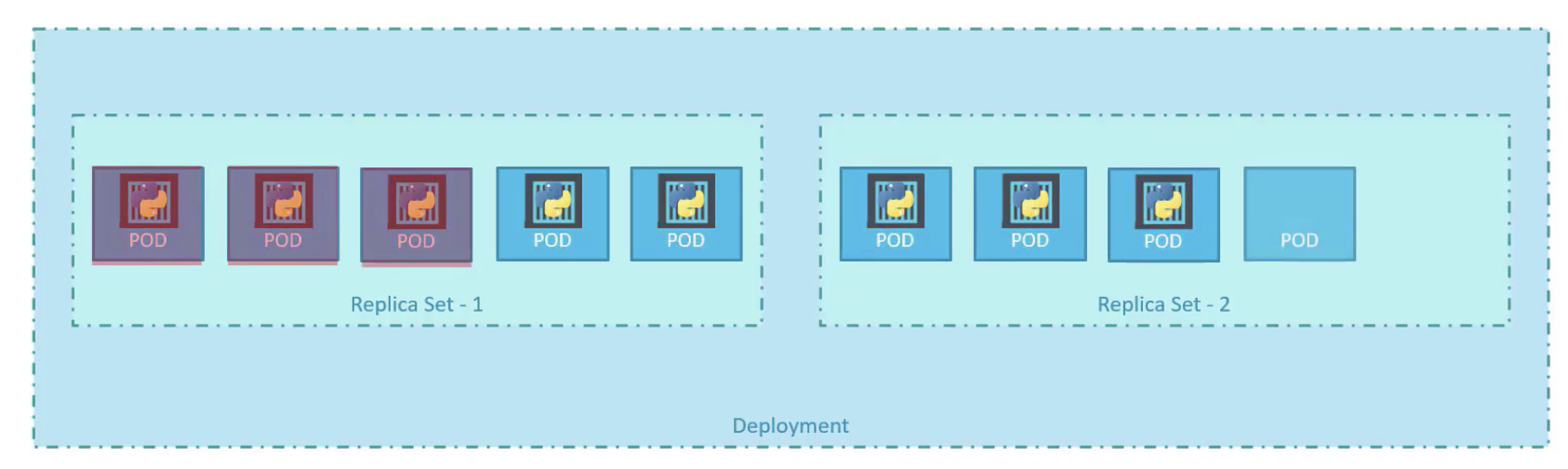 Deployment 안 Replica Set이 생기며, Pod 한개씩 대체되기 시작한다.
Rollback
롤백을 하게 되면 오래전의 Replica Set을 불러오게 된다.
kubectl rollout undo deployment/my-app-deployment
Let us try that. Upgrade the application by setting the image on the deployment to kodekloud/webapp-color:v2
Do not delete and re-create the deployment. Only set the new image name for the existing deployment.
kubectl edit deployment frontend
# 후 버전을 바꾸면 된다.
Change the deployment strategy to Recreate
Delete and re-create the deployment if necessary. Only update the strategy type for the existing deployment.
kubectl edit deployment frontend
# 후 버전을 바꾸고 strategt를 Recreate로 변경해야함.
Docker 환경 변수 넣기
Inspect the two files under directory webapp-color-2. What command is run at container startup?
Assume the image was created from the Dockerfile in this directory.
controlplane ~/webapp-color-2 ➜  cat webapp-color-pod.yaml
apiVersion: v1
kind: Pod
metadata:
  name: webapp-green
  labels:
      name: webapp-green
spec:
  containers:
  - name: simple-webapp
    image: kodekloud/webapp-color
    command: ["--color","green"]

controlplane ~/webapp-color-2 ➜  cat Dockerfile
FROM python:3.6-alpine

RUN pip install flask

COPY . /opt/

EXPOSE 8080

WORKDIR /opt

ENTRYPOINT ["python", "app.py"]

CMD ["--color", "red"]
Inspect the two files under directory webapp-color-3. What command is run at container startup?
Assume the image was created from the Dockerfile in this directory.
controlplane ~/webapp-color-3 ➜  cat Dockerfile
FROM python:3.6-alpine
RUN pip install flask
COPY . /opt/
EXPOSE 8080
WORKDIR /op
ENTRYPOINT ["python", "app.py"]
CMD ["--color", "red"]

controlplane ~/webapp-color-3 ➜  cat webapp-color-pod-2.yaml
apiVersion: v1
kind: Pod
metadata:
  name: webapp-green
  labels:
      name: webapp-green
spec:
  containers:
  - name: simple-webapp
    image: kodekloud/webapp-color
    command: ["python", "app.py"]
    args: ["--color", "pink"]
ConfigMap
pod의 env 변수 설정을 하게 도와준다. 보통 서버의 환경(검증,운영계), ~~ip주소 혹은 DB 계정정보(Secret 사용)~~를 지정해주면 좋을것이다.
# config-map.yaml
apiVersion: v1
kind: ConfigMap
metadata:
	name: **app-config**
data:
  SERVER_ENV: prd
  POSTGRE_URL: 127.0.0.1:5432
다음과 같이 설정되있으면, pod definition때 ConfigMap을 삽입해보자면, configMapRef란 곳에 configMap을 여러개 삽입할 수 있게 한다.
apiVersion: v1
kind: Pod
metadata:
  name: webapp
spec:
  containers:
  - name: webapp
    image: webapp
	  envFrom:
      - configMapRef:
        name: **app-config**
실습
env APP_COLOR 가 green 인 pod을 띄우시오
apiVersion: v1
kind: Pod
metadata:
  name: webapp-color
  labels:
    name: webapp-color

spec:
  containers:
    name: kodekloud/webapp-color
    image: webapp-color
  - env:
    - name: APP_COLOR
      value: green
How many ConfigMaps exists in the default namespace?
kubectl get ConfigMaps
Secret
ConfigMap이 아닌 민감정보 DB 계정정보의 경우 Secret을 통해 저장한다. key value에서 base64로 인코딩된 값을로 저장한다.
apiVersion: v1
kind: Secret
metadata:
  name: **app-secret**
data:
  DB_HOST: cgjfDfg=
  DB_PASSWORD: cFghfi
echo -n ‘root’ | base64 라고 명령어를 치면 base64 인코딩된 값이 추출된다.
apiVersion: v1
kind: Pod
metadata:
  name: webapp
spec:
  containers:
  - name: webapp
    image: webapp
	  envFrom:
      - secretRef:
        name: **app-secret**
Encrypting Secret Data At Rest ← 먼소린지 모르겟..
apt-get install etcd-client

ls /etc/kubernetes/pki/etcd

ETCDCTL_API=3 etcdctl \
   --cacert=/etc/kubernetes/pki/etcd/ca.crt   \
   --cert=/etc/kubernetes/pki/etcd/server.crt \
   --key=/etc/kubernetes/pki/etcd/server.key  \
   get /registry/secrets/default/my-secret

ls /etc/kubernetes/manifests/
Multi Container Pod
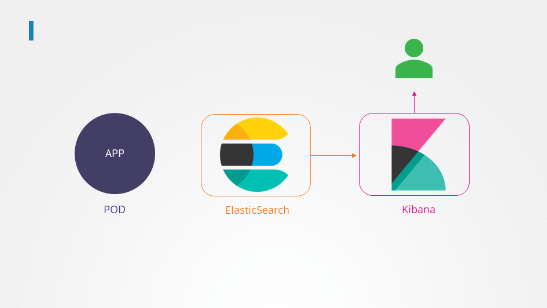
The application outputs logs to the file /log/app.log. View the logs and try to identify the user having issues with Login.
kubectl -n elastic-stack exec -it app -- cat /log/app.log
Edit the pod in the elastic-stack namespace to add a sidecar container to send logs to Elastic Search. Mount the log volume to the sidecar container.
Only add a new container. Do not modify anything else. Use the spec provided below.
Note: State persistence concepts are discussed in detail later in this course. For now please make use of the below documentation link for updating the concerning pod.
https://kubernetes.io/docs/tasks/access-application-cluster/communicate-containers-same-pod-shared-volume/
Requirements
- Name: app
- Container Name: sidecar
- Container Image: kodekloud/filebeat-configured
- Volume Mount: log-volume
- Mount Path: /var/log/event-simulator/
- Existing Container Name: app
- Existing Container Image: kodekloud/event-simulator
---
apiVersion: v1
kind: Pod
metadata:
  name: app
  namespace: elastic-stack
  labels:
    name: app
spec:
  containers:
  - name: app
    image: kodekloud/event-simulator
    volumeMounts:
    - mountPath: /log
      name: log-volume

  - name: sidecar
    image: kodekloud/filebeat-configured
    volumeMounts:
    - mountPath: /var/log/event-simulator/
      name: log-volume

  volumes:
  - name: log-volume
    hostPath:
      # directory location on host
      path: /var/log/webapp
      # this field is optional
      type: DirectoryOrCreate
Init Container
initContainers의 역할: 때로는 팟이 시작할 때만 필요한 일시적 작업이 있습니다. 이런 작업을 위해 **initContainers**를 사용합니다. 이 컨테이너들은 메인 애플리케이션이 시작하기 전에 필요한 사전 작업(예: 필요한 코드를 끌어오거나 외부 서비스의 가용성 확인)을 수행합니다.
상황: orange pod의 issue를 fix 하시오
# 무슨 일인지 살펴보자
kubectl describe pod orange

# 로그를 살펴보자
kubectl logs orange
kubectl logs orange -c init-myservice